
示例网站 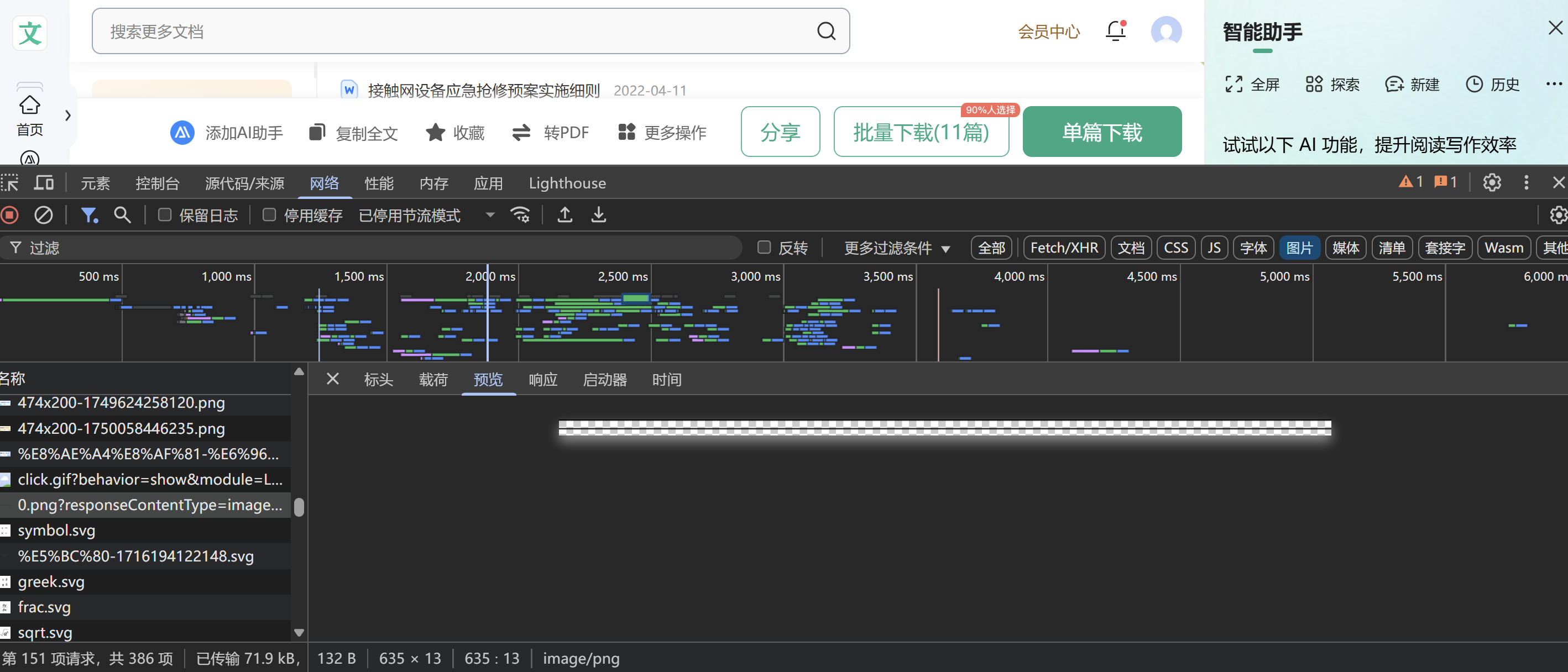 查看网络,发现其中的图片都不是我们需要的,是找到一个相关的分隔线,查看标头,我们提取其中一段进行搜索
  发现到两个js文件,和png图片,png图片就是分隔线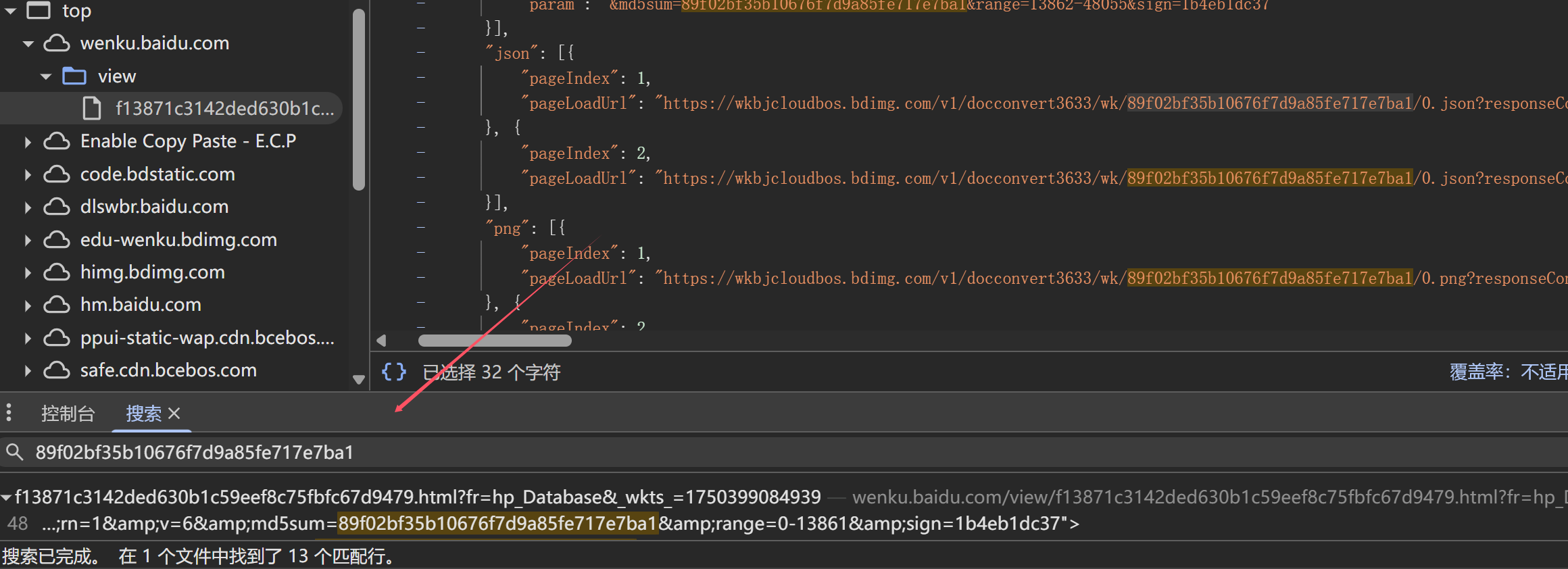
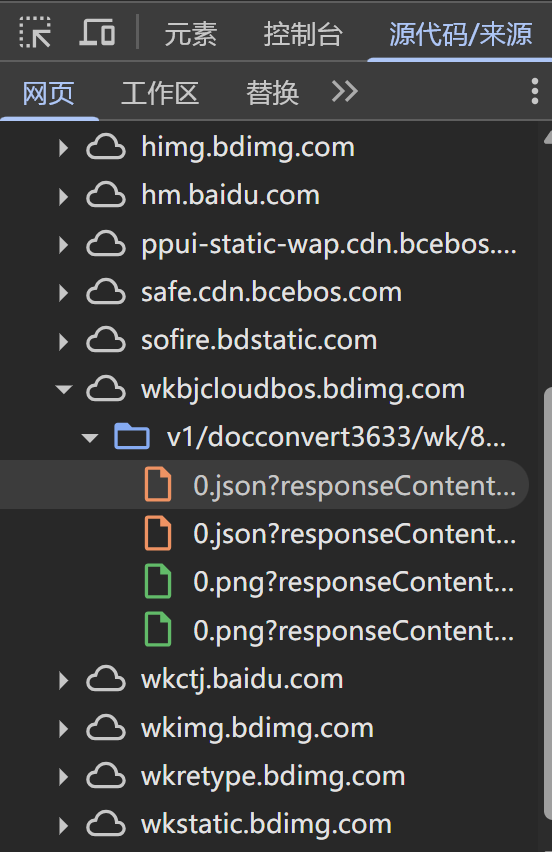 我们直接复制一部分js文件进行解析
wenku_1({"outline":null,"outlineMiss":null,"font":{"8a4d9d384b73f242336c5f440010001":"\u5b8b\u4f53","8a4d9d384b73f242336c5f440020001":"\u5b8b\u4f53","8a4d9d384b73f242336c5f440030001":"\u9ed1\u4f53","8a4d9d384b73f242336c5f440040001":"Arial","8a4d9d384b73f242336c5f440050001":"Arial Bold"},"style":[{"t":"style","c":[1,0],"s":{"font-size":"39.06"}},{"t":"style","c":[1],"s":{"font-family":"8a4d9d384b73f242336c5f440010001"}},{"t":"style","c":[0,1,6,7,10,17,18,2],"s":{"bold":"true"}},{"t":"style","c":[0,1,2,4,5,6,7,8,9,10,11,12,13,14,15,16,17,18,3],"s":{"color":"#000000"}},{"t":"style","c":[0,1,9,4],"s":{"font-size":"39.06"}},{"t":"style","c":[1,6,15,5],"s":{"font-family":"8a4d9d384b73f242336c5f440010001"}},{"t":"style","c":[1,6],"s":{"font-family":"8a4d9d384b73f242336c5f440010001"}},{"t":"style","c":[10,7],"s":{"font-family":"8a4d9d384b73f242336c5f440020001"}},{"t":"style","c":[7,9,10,11,14,16,8],"s":{"font-family":"8a4d9d384b73f242336c5f440020001"}},{"t":"style","c":[9],"s":{"font-family":"8a4d9d384b73f242336c5f440020001"}},{"t":"style","c":[10],"s":{"font-size":"15.84"}},{"t":"style","c":[16,11],"s":{"font-size":"21.06"}},{"t":"style","c":[11,15,16,12],"s":{"font-size":"21.06"}},{"t":"style","c":[14,13],"s":{"font-size":"36"}},{"t":"style","c":[14],"s":{"font-size":"36"}},{"t":"style","c":[15],"s":{"font-size":"21.06"}},{"t":"style","c":[16],"s":{"letter-spacing":"0.09"}},{"t":"style","c":[18,17],"s":{"font-size":"23.94"}},{"t":"style","c":[18],"s":{"font-family":"8a4d9d384b73f242336c5f440050001"}}],"body":[{"c":"\u5357\u660c\u8f68\u9053\u4ea4\u901a\u5730\u94c1\u8fd0\u8425\u6709\u9650\u516c\u53f8","p":{"h":39.06,"w":547.933,"x":172.47,"y":123.437,"z":0},"ps":null,"s":{"letter-spacing":"0.084"},"t":"word","r":[1]},{"c":" ","p":{"h":39.06,"w":19.529,"x":720.689,"y":123.437,"z":1},"ps":{"_enter":1},"s":{"bold":"true"},"t":"word","r":[0,7,9]},{"c":"\u6280\u672f\u6587\u4ef6","p":{"h":39.06,"w":156.552,"x":368.175,"y":193.637,"z":2},"ps":null,"s":{"letter-spacing":"0.104"},"t":"word","r":[1]},{"c":" ","p":{"h":15.84,"w":7.919,"x":524.805,"y":213.583,"z":3},"ps":{"_enter":1},"t":"word","r":[10]},{"c":" Q\/NGYY-B-SWGD-FB-03-2015 ","p":{"h":21.06,"w":588.269,"x":180.39,"y":261.299,"z":4},"ps":{"_enter":1},"s":{"letter-spacing":"-0.025"},"t":"word","r":[11]},{"c":"V1.0 ","p":{"h":21.06,"w":52.469,"x":716.189,"y":308.099,"z":5},"ps":{"_enter":1},"s":{"letter-spacing":"-0.044"},"t":"word","r":[11]},{"c":" ","p":{"h":39.06,"w":19.529,"x":446.475,"y":357.437,"z":6},"ps":null,"t":"word","r":[9]},{"c":" ","p":{"h":39.06,"w":19.529,"x":446.475,"y":427.682,"z":7},"ps":{"_enter":1},"t":"word","r":[9]},{"c":"\u63a5\u89e6\u7f51\u8bbe\u5907\u5e94\u6025\u62a2\u4fee\u9884\u6848\u5b9e\u65bd\u7ec6\u5219","p":{"h":39.06,"w":585.419,"x":153.929,"y":518.942,"z":8},"ps":null,"s":{"font-family":"8a4d9d384b73f242336c5f440030001","letter-spacing":"-0.034"},"t":"word","r":[4]},{"c":" ","p":{"h":39.06,"w":10.858,"x":739.23,"y":518.942,"z":9},"ps":{"_enter":1},"s":{"font-family":"8a4d9d384b73f242336c5f440040001"},"t":"word","r":[4]},{"c":"\uff08\u8bd5\u884c\u7a3f\uff09","p":{"h":36,"w":179.999,"x":356.475,"y":599.87,"z":10},"ps":null,"s":{"font-family":"8a4d9d384b73f242336c5f440010001"},"t":"word","r":[5,13]},{"c":" ","p":{"h":36,"w":18,"x":536.505,"y":599.87,"z":11},"ps":{"_enter":1},"t":"word","r":[14]},{"c":" ","p":{"h":36,"w":18,"x":446.475,"y":646.7,"z":12},"ps":{"_enter":1},"s":{"bold":"true"},"t":"word","r":[7,14]},{"c":" ","p":{"h":15.839,"w":7.92,"x":446.475,"y":697.858,"z":13},"ps":null,"t":"word","r":[10]},{"c":" ","p":{"h":15.839,"w":7.92,"x":446.475,"y":732.958,"z":14},"ps":null,"t":"word","r":[10]},{"c":" ","p":{"h":15.839,"w":7.92,"x":446.475,"y":768.058,"z":15},"ps":null,"t":"word","r":[10]},{"c":" ","p":{"h":15.839,"w":7.92,"x":446.475,"y":803.158,"z":16},"ps":null,"t":"word","r":[10]},{"c":" ","p":{"h":15.839,"w":7.92,"x":446.475,"y":838.258,"z":17},"ps":null,"t":"word","r":[10]},{"c":" ","p":{"h":15.839,"w":7.92,"x":446.475,"y":873.358,"z":18},"ps":null,"t":"word","r":[10]},{"c":" ","p":{"h":15.839,"w":7.92,"x":446.475,"y":908.458,"z":19},"ps":null,"t":"word","r":[10]},{"c":" ","p":{"h":15.839,"w":7.92,"x":446.475,"y":943.603,"z":20},"ps":null,"t":"word","r":[10]},{"c":" ","p":{"h":15.839,"w":7.92,"x":446.475,"y":978.703,"z":21},"ps":{"_enter":1},"t":"word","r":[10]},{"c":" ","p":{"h":15.839,"w":7.919,"x":135.036,"y":1013.803,"z":22},"ps":{"_enter":1},"t":"word","r":[10]},{"c":"2015","p":{"h":21.059,"w":42.014,"x":168.149,"y":1052.159,"z":23},"ps":null,"s":{"letter-spacing":"-0.035"},"t":"word","r":[11]},{"c":"\u2014","p":{"h":21.059,"w":21.06,"x":210.27,"y":1052.159,"z":24},"ps":null,"t":"word","r":[15]},{"c":"05","p":{"h":21.059,"w":21.15,"x":231.149,"y":1052.159,"z":25},"ps":null,"t":"word","r":[16]},{"c":"\u2014","p":{"h":21.059,"w":21.06,"x":252.209,"y":1052.159,"z":26},"ps":null,"t":"word","r":[15]},{"c":"01","p":{"h":21.059,"w":20.97,"x":273.27,"y":1052.159,"z":27},"ps":null,"s":{"letter-spacing":"-0.089"},"t":"word","r":[11]},{"c":"\u53d1\u5e03","p":{"h":21.059,"w":42.12,"x":299.594,"y":1052.159,"z":28},"ps":null,"t":"word","r":[15]},{"c":" 2015","p":{"h":21.059,"w":252.104,"x":341.534,"y":1052.159,"z":29},"ps":null,"s":{"letter-spacing":"-0.026"},"t":"word","r":[11]},{"c":"\u2014","p":{"h":21.059,"w":21.059,"x":593.745,"y":1052.159,"z":30},"ps":null,"t":"word","r":[15]},{"c":"06","p":{"h":21.059,"w":20.969,"x":614.625,"y":1052.159,"z":31},"ps":null,"s":{"letter-spacing":"-0.09"},"t":"word","r":[11]},{"c":"\u2014","p":{"h":21.059,"w":21.059,"x":635.685,"y":1052.159,"z":32},"ps":null,"t":"word","r":[15]},{"c":"01","p":{"h":21.059,"w":21.149,"x":656.564,"y":1052.159,"z":33},"ps":null,"t":"word","r":[16]},{"c":"\u5b9e\u65bd","p":{"h":21.059,"w":41.94,"x":683.069,"y":1052.159,"z":34},"ps":null,"s":{"letter-spacing":"-0.179"},"t":"word","r":[15]},{"c":" ","p":{"h":21.059,"w":10.529,"x":725.01,"y":1052.159,"z":35},"ps":{"_enter":1},"t":"word","r":[11]},{"c":"\u5357\u660c\u8f68\u9053\u4ea4\u901a\u5730\u94c1\u8fd0\u8425\u6709\u9650\u516c\u53f8","p":{"h":23.94,"w":508.206,"x":153.21,"y":1097.379,"z":36},"ps":{"_scaleX":1.522},"s":{"font-family":"8a4d9d384b73f242336c5f440010001","letter-spacing":"-0.156"},"t":"word","r":[6,17]},{"c":" ","p":{"h":23.94,"w":36.403,"x":661.469,"y":1097.379,"z":37},"ps":{"_scaleX":1.522},"s":{"font-family":"8a4d9d384b73f242336c5f440020001","letter-spacing":"-0.043"},"t":"word","r":[7,17]},{"c":"\u53d1\u5e03","p":{"h":21.059,"w":42.119,"x":697.65,"y":1099.853,"z":38},"ps":null,"s":{"bold":"true"},"t":"word","r":[6,15]},{"c":" ","p":{"h":23.94,"w":6.655,"x":739.95,"y":1097.379,"z":39},"ps":null,"t":"word","r":[18]},{"c":{"ix":0,"iy":0,"iw":636,"ih":1},"p":{"h":1,"w":636,"x":136,"y":287.437,"z":40},"ps":{"_vector":1},"s":null,"t":"pic"},{"c":{"ix":0,"iy":6,"iw":636,"ih":2},"p":{"h":2,"w":636,"x":136,"y":1082.437,"z":41},"ps":{"_vector":1},"s":null,"t":"pic"},{"c":" ","p":{"h":23.94,"w":6.655,"x":751.829,"y":1097.379,"z":42},"ps":{"_enter":1},"t":"word","r":[18]}],"page":{"ph":1262.879,"pw":892.979,"iw":636,"ih":8,"v":6,"t":"1","pptlike":false,"cx":135.036,"cy":123.437,"cw":636.964,"ch":997.882}})
解析出
南昌轨道交通地铁运营有限公司
技术文件
Q/NGYY-B-SWGD-FB-03-2015
V1.0
接触网设备应急抢修预案实施细(加粗, 黑体)
(试行稿)
2015—05—01发布                    2015—06—01实施 南昌轨道交通地铁运营有限公司 发布
所以我们就找到了他的内容地址就在js文件中,但是我们只看见两个js文件,接下来我们点击查看剩余全文加载更多,因为文库大部分都是动态js,所以我们看Fetch/XHR,按时间找 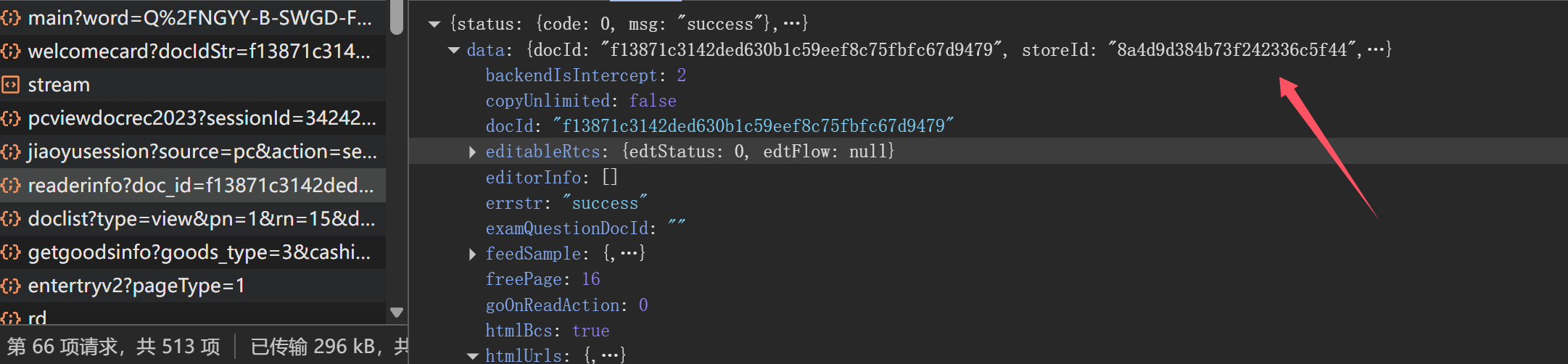
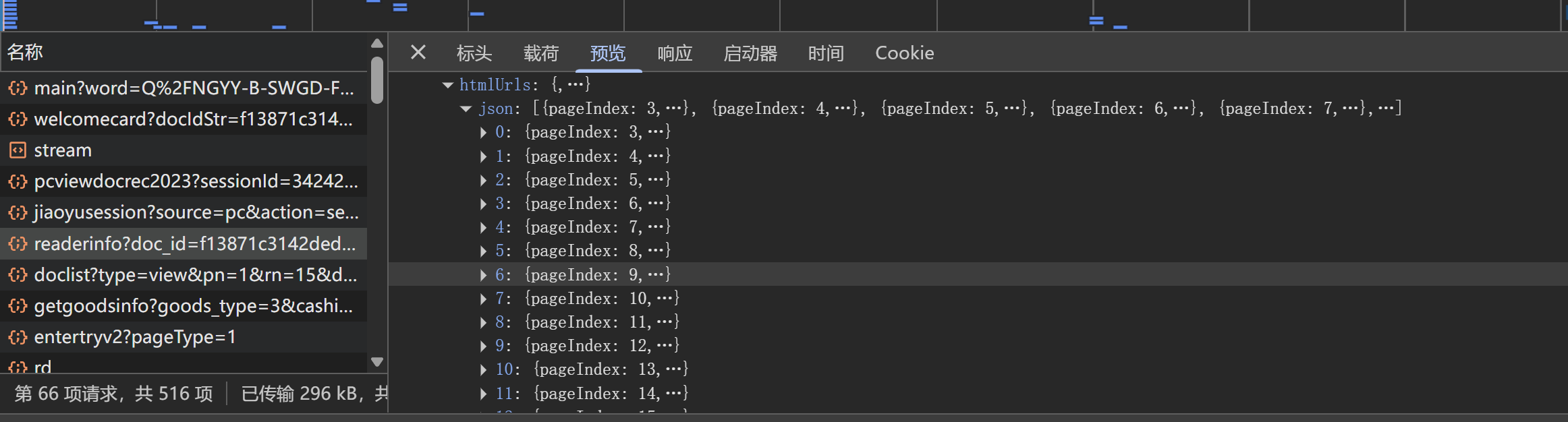 发现其中的htmlUrls里有我们要的js文件 我们试试请求
{"status":{"code":0,"msg":"need to verify pop-up window!"},"data":{"tri_reason":"ymg","tri_cap":true,"svcp_url":"https://seccaptcha.baidu.com/v1/webapi/verint/svcp.html?ak=M7bcdh2k6uqtYV5miaRiI8m8x6LIaONq&ext=YzLtBmKzcbmrLaZO5zWIYxasMhpseEXAPrfjovzuKU7G33U3WA4lGWqvu8LAwFhSognbsSwmFYW%2BFC0f7PpxMuVhNql5N2jv7%2B3MH6tO3Qg%3D&subid=wenku_pc_readerinfo_bfe&ts=1750402709&sign=97de5bc74d91cdadf5d4d92b6077de03"}}
结果被挡住了,我刚学不久,根本就不会过这个(如果有大佬会,求求教我),所以通过这个请求不了,那么我们换个办法。 运用网络捕捉即可
import os
import re
import time
import json
import random
import requests
import logging
import glob
import shutil
import threading
import queue
import traceback
import sys
from collections import defaultdict
from selenium import webdriver
from selenium.webdriver.chrome.service import Service
from selenium.webdriver.chrome.options import Options
from selenium.webdriver.common.by import By
from selenium.webdriver.support.ui import WebDriverWait
from selenium.webdriver.support import expected_conditions as EC
from selenium.common.exceptions import TimeoutException, NoSuchElementException
from docx import Document
from docx.shared import Pt, Cm, RGBColor
from docx.oxml.shared import qn
# 版权信息
COPYRIGHT_INFO = """
============================================================
吾爱破解论坛 - www.52pojie.cn
作者:pansuan
============================================================
警告:本工具仅供技术交流与学习使用,严禁用于商业倒卖!
任何未经授权的商业使用均属侵权行为,将承担法律责任。
============================================================
"""
# 定义全局常量
OUTPUT_BASE_DIR = r"C:\Users\16272\Downloads\文库"
os.makedirs(OUTPUT_BASE_DIR, exist_ok=True)
# 精简日志配置
logging.basicConfig(level=logging.INFO, format='%(message)s')
class NetworkCaptureThread(threading.Thread):
"""捕获核心文档数据请求的线程"""
def __init__(self, driver):
super().__init__()
self.driver = driver
self.captured_urls = queue.Queue()
self.running = True
self.daemon = True
def run(self):
"""捕获文档数据请求"""
while self.running:
try:
logs = self.driver.get_log('performance')
for entry in logs:
try:
message = json.loads(entry['message'])['message']
if message['method'] == 'Network.requestWillBeSent':
url = message['params']['request']['url']
if 'wkbjcloudbos.bdimg.com' in url and '/0.json' in url:
self.captured_urls.put(url)
except:
continue
time.sleep(0.5)
except:
time.sleep(1)
def stop(self):
self.running = False
def get_captured_urls(self):
urls = set()
while not self.captured_urls.empty():
urls.add(self.captured_urls.get())
return list(urls)
class BaiduWenkuDownloader:
def __init__(self):
self.driver = None
self.profile_path = None
self.doc_id = None
self.doc_title = "百度文库文档"
self.doc_url = None
self.data_urls = []
self.capture_thread = None
self.chrome_driver_path = r"D:\python\pythonProject1\xuexi\chromedriver.exe"
self.temp_dir = "downloaded_documents"
self.output_dir = OUTPUT_BASE_DIR
def get_or_create_profile(self):
"""获取或创建浏览器配置文件"""
profile_path = os.path.join(os.getcwd(), "chrome_profile")
os.makedirs(profile_path, exist_ok=True)
return profile_path
def setup_driver(self):
"""设置并返回 WebDriver"""
chrome_options = Options()
chrome_options.add_argument("--headless=new")
chrome_options.add_argument("--disable-gpu")
chrome_options.add_argument("--no-sandbox")
chrome_options.add_argument("--disable-dev-shm-usage")
chrome_options.add_argument("--window-size=1920,1080")
chrome_options.add_argument("--disable-blink-features=AutomationControlled")
chrome_options.set_capability("goog:loggingPrefs", {'performance': 'ALL'})
if self.profile_path and os.path.exists(self.profile_path):
chrome_options.add_argument(f"--user-data-dir={self.profile_path}")
try:
service = Service(executable_path=self.chrome_driver_path)
return webdriver.Chrome(service=service, options=chrome_options)
except Exception as e:
logging.error(f"初始化失败: {str(e)}")
return None
def get_total_pages(self):
"""获取文档总页数"""
try:
# 查找页数说明元素
WebDriverWait(self.driver, 10).until(
EC.presence_of_element_located((By.CSS_SELECTOR, "div.page-tips"))
)
# 查找所有页数说明元素
page_tips_elements = self.driver.find_elements(By.CSS_SELECTOR, "div.page-tips")
logging.info(f"找到 {len(page_tips_elements)} 个页数提示元素")
# 遍历元素查找页数
for element in page_tips_elements:
text = element.text
match = re.search(r'原始文档\s*共\s*(\d+)\s*页', text)
if match:
return int(match.group(1))
# 如果没找到,尝试估算
return self.estimate_page_count()
except:
# 如果失败则使用备用方法估算页数
return self.estimate_page_count()
def estimate_page_count(self):
"""估算文档页数"""
try:
# 尝试查找页面元素
pages = self.driver.find_elements(By.CSS_SELECTOR, ".page-item, .page-wrapper, .ppt-page")
if len(pages) > 0:
return len(pages)
# 尝试基于内容高度估算
page_height = self.driver.execute_script("return document.body.scrollHeight")
viewport_height = self.driver.execute_script("return window.innerHeight")
return max(1, round(page_height / viewport_height))
except:
return 1 # 默认值
def calculate_clicks_needed(self, total_pages):
"""通用的点击次数计算公式"""
# 基础规则:
# - 每100页点击1次
# - 至少点击1次
# - 最大10次
return min(10, max(1, (total_pages + 99) // 100))
def perform_fixed_clicks(self, clicks_needed):
"""执行固定次数的点击操作"""
# 先滚动到顶部确保按钮可见
self.driver.execute_script("window.scrollTo(0, 0);")
time.sleep(1)
for click_count in range(clicks_needed):
try:
# 尝试多种选择器查找展开按钮
selector = "div.btn.unfold.light, div.fold-button, div.moreBtn, div.unfold-btn, .more-btn"
expand_btn = WebDriverWait(self.driver, 3).until(
EC.element_to_be_clickable((By.CSS_SELECTOR, selector))
)
# 滚动到按钮位置
self.driver.execute_script("arguments[0].scrollIntoView({behavior: 'smooth', block: 'center'});",
expand_btn)
time.sleep(0.5)
# 点击按钮
self.driver.execute_script("arguments[0].click();", expand_btn)
time.sleep(random.uniform(1.5, 2.5))
except:
# 如果找不到按钮,继续下一次尝试
pass
def handle_popups(self):
"""处理弹窗"""
try:
# 尝试点击继续阅读按钮
continue_btn = WebDriverWait(self.driver, 3).until(
EC.element_to_be_clickable(
(By.XPATH, "//div[contains(text(), '继续阅读') or contains(text(), '点击继续阅读')]"))
)
continue_btn.click()
time.sleep(1)
except:
pass
try:
# 尝试关闭登录提示
close_btn = WebDriverWait(self.driver, 2).until(
EC.element_to_be_clickable((By.CSS_SELECTOR, "div.close-btn, span.banner-close, .dialog-close"))
)
close_btn.click()
except:
pass
def scroll_document_by_pages(self, total_pages):
"""智能滚动文档内容"""
# 计算分段数
segments = min(25, (total_pages + 14) // 15) # 限制最大25段
start_page = 0
# 开始滚动
for i in range(1, segments + 1):
# 计算当前目标页
target_page = min(total_pages, i * 15)
# 更新进度显示
sys.stdout.write(f"\r滚动到第 {target_page} 页 [{i}/{segments}]")
sys.stdout.flush()
# 滚动到目标页面
self.scroll_to_page(target_page, total_pages)
# 处理新出现的按钮
self.handle_expand_buttons_in_view()
time.sleep(random.uniform(0.2, 0.5))
# 滚动完成后清除进度显示
sys.stdout.write('\r')
sys.stdout.flush()
def scroll_to_page(self, page_num, total_pages):
"""滚动到特定页码"""
try:
# 尝试通过ID定位
page_id = f"original-pageNo-{page_num}"
page_element = WebDriverWait(self.driver, 1).until(
EC.presence_of_element_located((By.ID, page_id))
)
self.driver.execute_script("arguments[0].scrollIntoView({behavior: 'smooth'});", page_element)
return
except:
try:
# 尝试通过页码文本定位
page_text = f"第{page_num}页"
page_element = WebDriverWait(self.driver, 1).until(
EC.presence_of_element_located((By.XPATH, f"//*[contains(text(), '{page_text}')]"))
)
self.driver.execute_script("arguments[0].scrollIntoView();", page_element)
except:
# 最后手段:按百分比滚动
percent = min(100, max(0, (page_num / total_pages) * 100))
self.driver.execute_script(f"window.scrollTo(0, document.body.scrollHeight * {percent / 100});")
def scroll_to_next_page_element(self):
"""滚动定位到包含'下一篇:'的分页元素"""
try:
# 尝试查找分页元素
pagination_element = WebDriverWait(self.driver, 3).until(
EC.presence_of_element_located(
(By.XPATH, "//div[contains(@class, 'pcstep-foot-pagination') and contains(., '下一篇:')]"))
)
# 滚动到分页元素位置
self.driver.execute_script("arguments[0].scrollIntoView({behavior: 'smooth', block: 'end'});",
pagination_element)
time.sleep(1)
return True
except TimeoutException:
logging.info("未找到底部分页元素,可能已到底部或单篇文档")
return False
except Exception as e:
logging.warning(f"滚动到分页元素时出错: {str(e)}")
return False
def handle_expand_buttons_in_view(self):
"""处理当前视图中的展开按钮"""
try:
# 尝试查找展开按钮
selector = "div.btn.unfold.light, div.fold-button, div.moreBtn, div.unfold-btn, .more-btn"
expand_btn = self.driver.find_element(By.CSS_SELECTOR, selector)
# 如果按钮可见则点击
if expand_btn.is_displayed():
self.driver.execute_script("arguments[0].click();", expand_btn)
time.sleep(1)
return True
except:
pass
return False
def extract_document_title(self):
"""提取文档标题"""
try:
title = self.driver.title
if title and "百度文库" in title:
title = title.replace("- 百度文库", "").strip()
clean_title = re.sub(r'[\\/*?:"<>|]', '', title)
return clean_title[:100] if len(clean_title) > 100 else clean_title
except:
return "百度文库文档"
def process_document(self, doc_url):
"""处理文库文档"""
doc_id_match = re.search(r'/view/([a-f0-9]{24,40})', doc_url) or \
re.search(r'/docview/([a-f0-9]{24,40})', doc_url) or \
re.search(r'share/[a-f0-9]{32}/([a-f0-9]{24,40})', doc_url)
self.doc_id = doc_id_match.group(1) if doc_id_match else None
if not self.doc_id:
logging.error("无法从URL中提取文档ID")
return False
try:
self.capture_thread = NetworkCaptureThread(self.driver)
self.capture_thread.start()
self.driver.get(doc_url)
self.doc_title = self.extract_document_title()
# 处理弹窗
time.sleep(2)
self.handle_popups()
# 获取文档实际页数
total_pages = self.get_total_pages()
logging.info(f"检测到文档实际共 {total_pages} 页")
# 执行固定次数的点击
clicks_needed = self.calculate_clicks_needed(total_pages)
logging.info(f"需要执行 {clicks_needed} 次点击")
self.perform_fixed_clicks(clicks_needed)
# 智能滚动查看文档
if total_pages > 0:
self.scroll_document_by_pages(total_pages)
# 滚动到底部分页元素(新增功能)
self.scroll_to_next_page_element()
self.data_urls = self.capture_thread.get_captured_urls()
return True
except Exception as e:
logging.error(f"处理文档时出错: {str(e)}")
traceback.print_exc()
return False
def download_data_files(self):
"""下载文档数据文件"""
if not self.data_urls:
return []
doc_dir = os.path.join(self.temp_dir, self.doc_id)
os.makedirs(doc_dir, exist_ok=True)
downloaded_files = []
for i, url in enumerate(self.data_urls):
try:
filename = f"{i:03d}_{url.split('/')[-1].split('?')[0]}"
save_path = os.path.join(doc_dir, filename)
if self.download_file(url, save_path):
downloaded_files.append(save_path)
time.sleep(0.5)
except:
pass
return downloaded_files
def download_file(self, url, save_path):
"""下载单个文件"""
try:
headers = {
"User-Agent": "Mozilla/5.0 (Windows NT 10.0; Win64; x64) AppleWebKit/537.36 (KHTML, like Gecko) Chrome/119.0.0.0 Safari/537.36",
"Referer": f"https://wenku.baidu.com/view/{self.doc_id}.html"
}
response = requests.get(url, headers=headers, timeout=5)
with open(save_path, 'wb') as f:
f.write(response.content)
return True
except:
return False
def rename_and_sort_documents(self, doc_folder):
"""重命名并排序文档文件"""
input_folder = os.path.join(self.temp_dir, doc_folder)
original_files = glob.glob(os.path.join(input_folder, "*.json"))
wenku_files = []
for file_path in original_files:
if "urls.json" in file_path:
continue
try:
with open(file_path, "r", encoding="utf-8") as f:
content = f.read()
match = re.search(r'wenku_(\d+)\(', content)
if match:
wenku_files.append((int(match.group(1)), file_path))
except:
pass
if not wenku_files:
return False
wenku_files.sort(key=lambda x: x[0])
temp_folder = os.path.join(input_folder, "temp_rename")
os.makedirs(temp_folder, exist_ok=True)
for i, (_, orig_path) in enumerate(wenku_files):
temp_path = os.path.join(temp_folder, f"000_{i}.json")
shutil.copy2(orig_path, temp_path)
for file_path in original_files:
if os.path.exists(file_path):
os.remove(file_path)
for i, (_, _) in enumerate(wenku_files):
temp_path = os.path.join(temp_folder, f"000_{i}.json")
new_path = os.path.join(input_folder, f"000_{i}.json")
shutil.move(temp_path, new_path)
shutil.rmtree(temp_folder)
return True
@staticmethod
def extract_json_from_jsonp(jsonp_str):
start = jsonp_str.find('{')
end = jsonp_str.rfind('}') + 1
return jsonp_str[start:end] if start != -1 and end != -1 and end > start else jsonp_str
@staticmethod
def parse_font_mapping(font_data):
font_map = {}
for key, value in font_data.items():
if isinstance(value, str) and "\\u" in value:
try:
font_map[key] = value.encode('latin1').decode('unicode_escape')
except:
font_map[key] = value
else:
font_map[key] = value
return font_map
@staticmethod
def parse_style_data(style_data):
styles = {}
for style in style_data:
if "c" in style and "s" in style:
if isinstance(style["c"], int):
styles[style["c"]] = style["s"]
elif isinstance(style["c"], list):
for idx in style["c"]:
styles[idx] = style["s"]
return styles
def parse_document_data(self, raw_jsonp_str):
try:
json_str = self.extract_json_from_jsonp(raw_jsonp_str)
json_data = json.loads(json_str)
font_map = self.parse_font_mapping(json_data.get("font", {}))
style_data = self.parse_style_data(json_data.get("style", []))
content_by_line = defaultdict(list)
for item in json_data.get("body", []):
if "p" not in item or "y" not in item["p"]:
continue
styles = {}
if "r" in item:
if isinstance(item["r"], int) and item["r"] in style_data:
styles.update(style_data[item["r"]])
elif isinstance(item["r"], list):
for r_index in item["r"]:
if r_index in style_data:
styles.update(style_data[r_index])
if "font-family" in styles and styles["font-family"] in font_map:
styles["font-family"] = font_map[styles["font-family"]]
y_pos = item["p"]["y"]
line_key = round(y_pos)
content = item.get("c", "")
if isinstance(content, str):
content_by_line[line_key].append({
"text": content,
"x": item["p"]["x"],
"styles": styles
})
elif isinstance(content, dict) and "t" in content and content["t"] == "word" and "c" in content:
content_by_line[line_key].append({
"text": content["c"],
"x": item["p"]["x"],
"styles": styles
})
return sorted(content_by_line.items(), key=lambda x: x[0])
except:
return []
@staticmethod
def set_default_font(doc):
style = doc.styles['Normal']
style.font.name = "SimSun"
style.font.size = Pt(14)
style.font.color.rgb = RGBColor(0, 0, 0)
style._element.rPr.rFonts.set(qn('w:eastAsia'), u'SimSun')
style.paragraph_format.space_before = Pt(0)
style.paragraph_format.space_after = Pt(0)
style.paragraph_format.line_spacing = 1.0
@staticmethod
def apply_uniform_style(run):
run.font.name = "SimSun"
run._element.rPr.rFonts.set(qn('w:eastAsia'), u'SimSun')
run.font.size = Pt(14)
run.font.color.rgb = RGBColor(0, 0, 0)
run.font.bold = False
run.font.italic = False
def generate_word_document(self):
doc_dir = os.path.join(self.temp_dir, self.doc_id)
if not os.path.exists(doc_dir):
return False
output_path = os.path.join(self.output_dir, f"{self.doc_title}.docx")
json_files = []
for filename in os.listdir(doc_dir):
if filename.endswith('.json') and filename != "urls.json" and '000_' in filename:
match = re.search(r'000_(\d+).json', filename)
if match:
json_files.append((int(match.group(1)), filename))
if not json_files:
return False
json_files.sort(key=lambda x: x[0])
doc = Document()
self.set_default_font(doc)
section = doc.sections[0]
section.page_width = Cm(21.0)
section.page_height = Cm(29.7)
section.left_margin = Cm(3.18)
section.right_margin = Cm(3.18)
section.top_margin = Cm(2.54)
section.bottom_margin = Cm(2.54)
for file_num, filename in json_files:
file_path = os.path.join(doc_dir, filename)
try:
with open(file_path, 'r', encoding='utf-8') as f:
content_by_line = self.parse_document_data(f.read())
for line_y, items in content_by_line:
sorted_items = sorted(items, key=lambda x: x["x"])
para = doc.add_paragraph()
for item in sorted_items:
text = item.get("text", "")
if isinstance(text, str) and text.strip():
run = para.add_run(text)
self.apply_uniform_style(run)
except:
pass
doc.save(output_path)
return True
def cleanup_temp_files(self):
doc_dir = os.path.join(self.temp_dir, self.doc_id)
if os.path.exists(doc_dir):
try:
shutil.rmtree(doc_dir)
return True
except:
return False
return True
def main(self):
print(COPYRIGHT_INFO)
self.profile_path = self.get_or_create_profile()
self.driver = self.setup_driver()
if not self.driver:
print("无法初始化WebDriver")
return
self.doc_url = input("请输入百度文库文档URL: ").strip()
if not self.doc_url:
print("未提供URL,程序退出")
return
try:
if self.process_document(self.doc_url):
downloaded_files = self.download_data_files()
if downloaded_files:
if self.rename_and_sort_documents(self.doc_id):
if self.generate_word_document():
output_path = os.path.join(self.output_dir, f"{self.doc_title}.docx")
print(f"文档已保存至: {output_path}")
self.cleanup_temp_files()
else:
print("Word文档生成失败")
else:
print("文件重命名失败")
else:
print("没有可下载的文件")
else:
print("文档处理失败")
except Exception as e:
print(f"处理过程中出错: {str(e)}")
traceback.print_exc()
finally:
if self.capture_thread:
self.capture_thread.stop()
self.capture_thread.join(timeout=2)
if self.driver:
self.driver.quit()
print("\n吾爱破解论坛 - www.52pojie.cn")
print("作者:pansuan")
print("本工具仅供学习交流,严禁商业倒卖!")
if __name__ == "__main__":
downloader = BaiduWenkuDownloader()
downloader.main()
JS数据中也有坐标信息,结合文字图片这个方法应该是可以完成的,但是对我来说还是太难了,如果有会的大佬可以来讨论一下(目前这个只输出文本,图片未插入) 完成流程 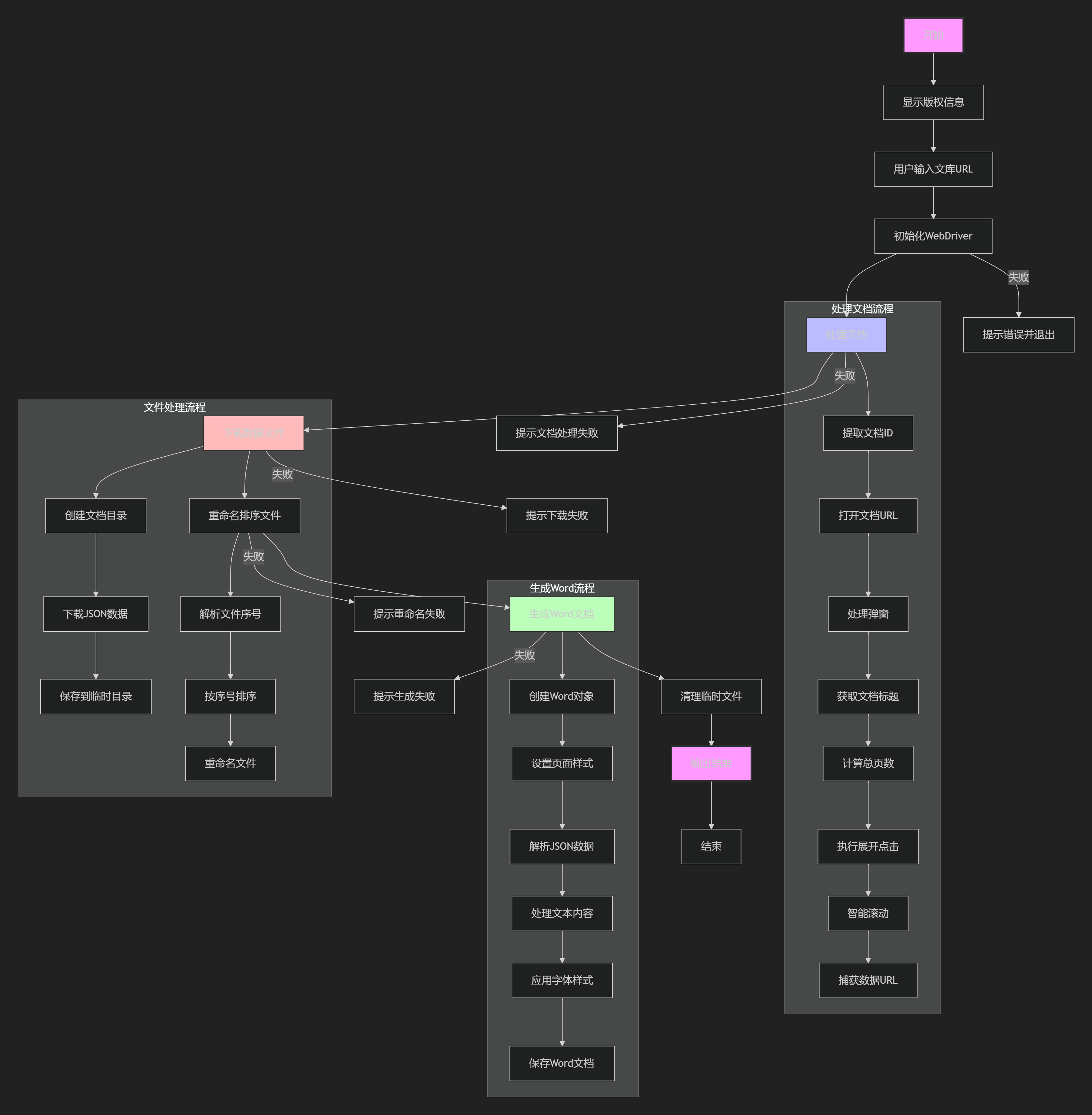
[免责声明:仅限用于学习和研究目的;不得将上述内容用于商业或者非法用途,否则,一切后果请用户自负。您必须在下载后的24个小时之内,从您的电脑或手机中彻底删除上述内容。]
文档信息
- 本文作者:pansuan
- 本文链接:https://pan.pansuan.xyz/2025/06/27/python-wenku-WORD-with-python/
- 版权声明:自由转载-非商用-非衍生-保持署名(创意共享4.0许可证)