
前提,大部分文档展开全文需要会员,所以要有个会员账号,有没有下载次数无所谓,能展开就行,可以去找共享,反正便宜的会员大把。
浏览XX文库发现有三种形式的预览,分别为PPT-图片格式,可在线编辑文字,base64-png渲染格式。(标准名字我不懂,我是非专业的小白) 因此从网页中提取出他们有几种方法。 除了最难的base64-png渲染格式,剩下可在线编辑文字和PPT图片格式都很简单。 PPT图片格式 示例网站 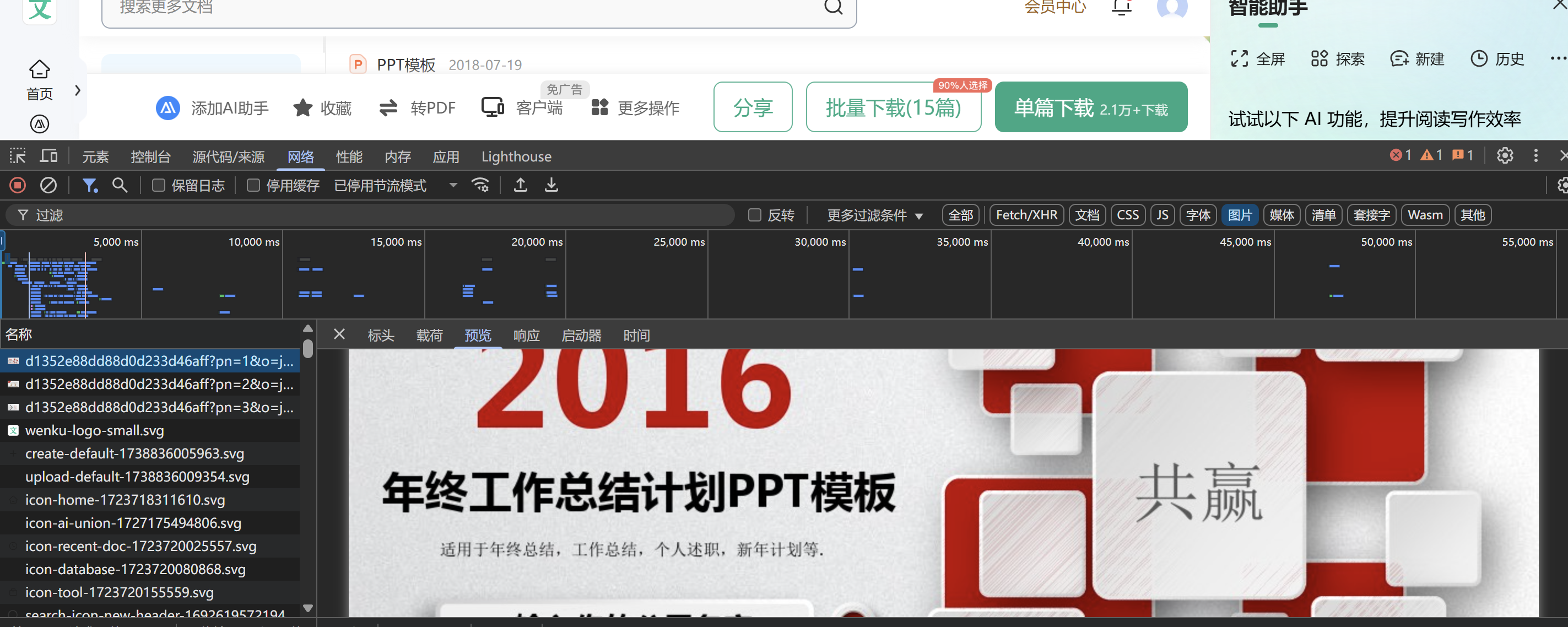 打开网络,直奔图片就可以找到好几张文档的图片 直接搜一下他的请求路径
 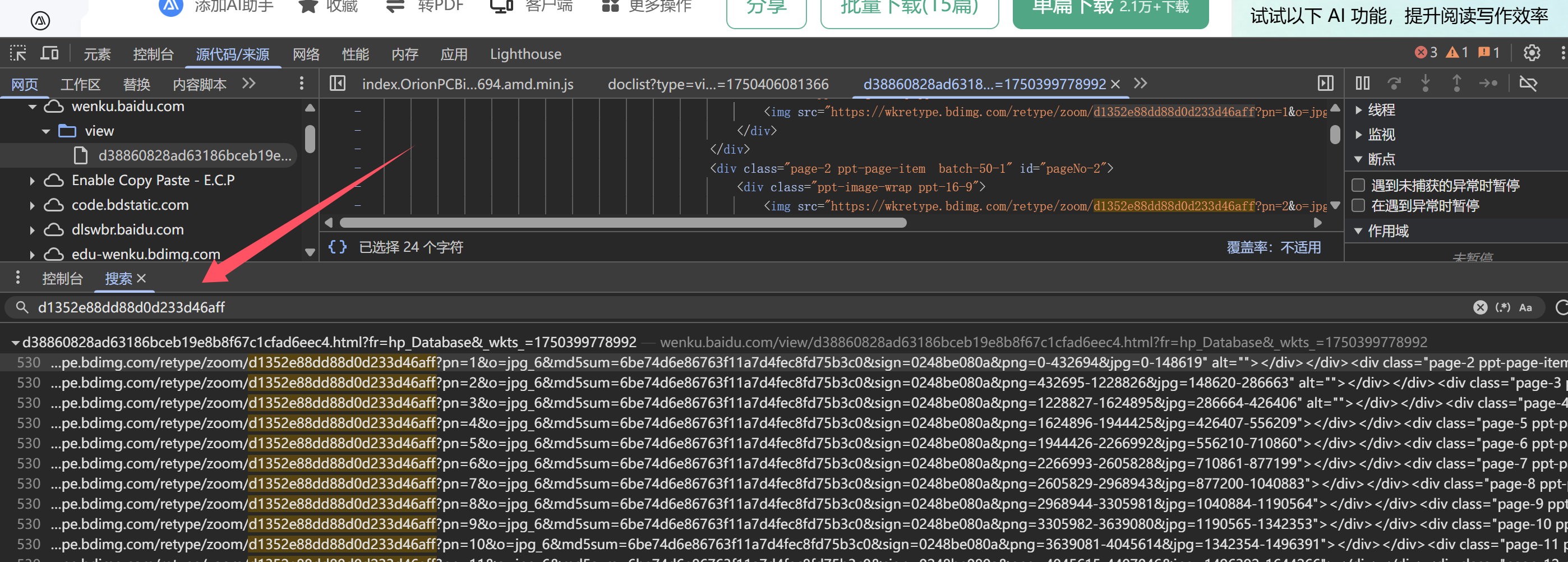 就可以了他图片路径,很整齐,但是却是不完整的,原因是文档没有展开完全,所以我们点击查看剩余全文(是需要登入账号的,所以写脚本时,记得配置一下信息) 但是展开后没有看见他的信息加载,那么我们回到找到的图片那,查看源代码/来源
  可以发现所有加载的图片已经在这里了,那么直接开始写
import os
import time
import random
import re
import requests
import sys
from selenium import webdriver
from selenium.webdriver.chrome.service import Service as ChromeService
from selenium.webdriver.common.by import By
from selenium.webdriver.support.ui import WebDriverWait
from selenium.webdriver.support import expected_conditions as EC
import img2pdf
from PIL import Image
from selenium.common.exceptions import TimeoutException, NoSuchElementException

# 配置路径
USER_DATA_DIR = r"D:\python\pythonProject1\xuexi\chrome_profile"
CHROMEDRIVER_PATH = r"D:\python\pythonProject1\xuexi\chromedriver.exe"
OUTPUT_DIR = r"C:\Users\16272\Downloads\文库"


def expand_document(url):
    """使用无头浏览器展开文档并获取文档信息"""
    chrome_options = webdriver.ChromeOptions()
    chrome_options.add_argument(f"user-data-dir={USER_DATA_DIR}")
    chrome_options.add_argument("--headless=new")
    chrome_options.add_argument("--disable-gpu")
    chrome_options.add_argument("--no-sandbox")
    chrome_options.add_argument("--disable-dev-shm-usage")

    chrome_service = ChromeService(executable_path=CHROMEDRIVER_PATH)
    driver = webdriver.Chrome(service=chrome_service, options=chrome_options)

    try:
        driver.get(url)
        time.sleep(2)
        handle_popups(driver)

        # 获取文档标题
        title = get_document_title(driver)
        print(f"文档标题: {title}")

        total_pages = get_total_pages(driver) or 1
        print(f"文档共 {total_pages} 页")

        clicks_needed = calculate_clicks_needed(total_pages)
        print(f"需要执行 {clicks_needed} 次点击")
        perform_fixed_clicks(driver, clicks_needed)

        if total_pages > 0:
            print("\n滚动开始...")
            scroll_document_by_pages(driver, total_pages)
            time.sleep(2)

        image_urls = get_image_urls(driver)
        return image_urls, title

    except Exception as e:
        print(f"处理错误: {str(e)}")
        return [], "百度文库PPT"
    finally:
        driver.quit()


def get_document_title(driver):
    """从页面元素中获取文档标题"""
    try:
        title_element = WebDriverWait(driver, 5).until(
            EC.presence_of_element_located((By.CSS_SELECTOR, "div.doc-title-text"))
        )
        title = title_element.text.strip()

        # 清理文件名中的非法字符
        title = re.sub(r'[\\/*?:"<>|]', "", title)

        # 如果标题为空或过长,使用默认值
        if not title or len(title) > 100:
            return "百度文库PPT"
        return title
    except:
        return "百度文库PPT"


def get_total_pages(driver):
    """获取文档总页数"""
    try:
        # 查找页数说明元素
        WebDriverWait(driver, 10).until(
            EC.presence_of_element_located((By.CSS_SELECTOR, "div.page-tips"))
        )

        # 查找所有页数说明元素
        page_tips_elements = driver.find_elements(By.CSS_SELECTOR, "div.page-tips")
        print(f"找到 {len(page_tips_elements)} 个页数提示元素")

        # 遍历元素查找页数
        for element in page_tips_elements:
            text = element.text
            match = re.search(r'原始文档\s*共\s*(\d+)\s*页', text)
            if match:
                return int(match.group(1))

        # 如果没找到,尝试估算
        return estimate_page_count(driver)

    except:
        # 如果失败则使用备用方法估算页数
        return estimate_page_count(driver)


def estimate_page_count(driver):
    """估算文档页数"""
    try:
        # 尝试查找页面元素
        pages = driver.find_elements(By.CSS_SELECTOR, ".page-item, .page-wrapper, .ppt-page")
        if len(pages) > 0:
            return len(pages)

        # 尝试基于内容高度估算
        page_height = driver.execute_script("return document.body.scrollHeight")
        viewport_height = driver.execute_script("return window.innerHeight")
        return max(1, round(page_height / viewport_height))

    except:
        return 1  # 默认值


def calculate_clicks_needed(total_pages):
    """通用的点击次数计算公式"""
    # 基础规则:
    # - 每100页点击1次
    # - 至少点击1次
    # - 最大10次
    return min(10, max(1, (total_pages + 99) // 100))


def perform_fixed_clicks(driver, clicks_needed):
    """执行固定次数的点击操作"""
    # 先滚动到顶部确保按钮可见
    driver.execute_script("window.scrollTo(0, 0);")
    time.sleep(1)

    for click_count in range(clicks_needed):
        try:
            # 尝试多种选择器查找展开按钮
            selector = "div.btn.unfold.light, div.fold-button, div.moreBtn, div.unfold-btn, .more-btn"
            expand_btn = WebDriverWait(driver, 3).until(
                EC.element_to_be_clickable((By.CSS_SELECTOR, selector))
            )

            # 滚动到按钮位置
            driver.execute_script("arguments[0].scrollIntoView({behavior: 'smooth', block: 'center'});", expand_btn)
            time.sleep(0.5)

            # 点击按钮
            driver.execute_script("arguments[0].click();", expand_btn)
            sys.stdout.write(f"\r点击进度: {click_count + 1}/{clicks_needed}")
            sys.stdout.flush()
            time.sleep(random.uniform(1.5, 2.5))
        except:
            # 如果找不到按钮,继续下一次尝试
            pass
    print()


def handle_popups(driver):
    """处理弹窗"""
    try:
        # 尝试点击继续阅读按钮
        continue_btn = WebDriverWait(driver, 3).until(
            EC.element_to_be_clickable(
                (By.XPATH, "//div[contains(text(), '继续阅读') or contains(text(), '点击继续阅读')]"))
        )
        continue_btn.click()
        time.sleep(1)
    except:
        pass

    try:
        # 尝试关闭登录提示
        close_btn = WebDriverWait(driver, 2).until(
            EC.element_to_be_clickable((By.CSS_SELECTOR, "div.close-btn, span.banner-close, .dialog-close"))
        )
        close_btn.click()
    except:
        pass


def scroll_document_by_pages(driver, total_pages):
    """智能滚动文档内容"""
    # 计算分段数
    segments = min(25, (total_pages + 14) // 15)  # 限制最大25段

    # 开始滚动
    for i in range(1, segments + 1):
        # 计算当前目标页
        target_page = min(total_pages, i * 15)

        # 更新进度显示
        sys.stdout.write(f"\r滚动进度: {target_page}/{total_pages}页 [{i}/{segments}段]")
        sys.stdout.flush()

        # 滚动到目标页面
        scroll_to_page(driver, target_page, total_pages)

        # 处理新出现的按钮
        handle_expand_buttons_in_view(driver)

        time.sleep(random.uniform(0.2, 0.5))

    # 滚动完成后清除进度显示
    print()


def scroll_to_page(driver, page_num, total_pages):
    """滚动到特定页码"""
    try:
        # 尝试通过ID定位
        page_id = f"original-pageNo-{page_num}"
        page_element = WebDriverWait(driver, 1).until(
            EC.presence_of_element_located((By.ID, page_id))
        )
        driver.execute_script("arguments[0].scrollIntoView({behavior: 'smooth'});", page_element)
        return
    except:
        try:
            # 尝试通过页码文本定位
            page_text = f"第{page_num}页"
            page_element = WebDriverWait(driver, 1).until(
                EC.presence_of_element_located((By.XPATH, f"//*[contains(text(), '{page_text}')]"))
            )
            driver.execute_script("arguments[0].scrollIntoView();", page_element)
        except:
            # 最后手段:按百分比滚动
            percent = min(100, max(0, (page_num / total_pages) * 100))
            driver.execute_script(f"window.scrollTo(0, document.body.scrollHeight * {percent / 100});")


def handle_expand_buttons_in_view(driver):
    """处理当前视图中的展开按钮"""
    try:
        # 尝试查找展开按钮
        selector = "div.btn.unfold.light, div.fold-button, div.moreBtn, div.unfold-btn, .more-btn"
        expand_btn = driver.find_element(By.CSS_SELECTOR, selector)

        # 如果按钮可见则点击
        if expand_btn.is_displayed():
            driver.execute_script("arguments[0].click();", expand_btn)
            time.sleep(1)
            return True
    except:
        pass
    return False


def get_image_urls(driver):
    """获取所有图片URL - 优化版本"""
    # 更宽泛的正则表达式,匹配更多可能的图片URL格式
    pattern = re.compile(r"https?://wkretype\.bdimg\.com/retype/zoom/[a-f0-9]+\?pn=\d+")

    # 方法1: 从页面中所有img元素获取
    urls = []
    for img in driver.find_elements(By.TAG_NAME, "img"):
        img_url = img.get_attribute("src") or img.get_attribute("data-src")
        if img_url and pattern.search(img_url):
            full_url = img_url if img_url.startswith("http") else "https:" + img_url
            urls.append(full_url)

    # 方法2: 如果第一种方法获取不足,从页面源码中提取
    if not urls:
        matches = pattern.findall(driver.page_source)
        urls = [u if u.startswith("http") else "https:" + u for u in matches]

    # 去重并排序
    unique_urls = list(set(urls))
    try:
        unique_urls.sort(key=lambda u: int(re.search(r"pn=(\d+)", u).group(1)))
    except:
        pass  # 如果排序失败,保持原始顺序

    return unique_urls


def download_images(image_urls, temp_dir):
    """下载图片到临时目录"""
    os.makedirs(temp_dir, exist_ok=True)
    headers = {
        "User-Agent": "Mozilla/5.0 (Windows NT 10.0; Win64; x64) AppleWebKit/537.36 (KHTML, like Gecko) Chrome/91.0.4472.124 Safari/537.36",
        "Referer": "https://wenku.baidu.com/"
    }
    image_paths = []

    for i, url in enumerate(image_urls):
        try:
            sys.stdout.write(f"\r下载进度: {i + 1}/{len(image_urls)} 图片")
            sys.stdout.flush()

            response = requests.get(url, headers=headers, stream=True, timeout=15)
            if response.status_code == 200:
                file_path = os.path.join(temp_dir, f"page_{i + 1}.jpg")
                with open(file_path, "wb") as f:
                    for chunk in response.iter_content(1024):
                        f.write(chunk)
                image_paths.append(file_path)

            time.sleep(random.uniform(0.2, 0.5))
        except Exception as e:
            print(f"\n下载失败: {url} - {str(e)}")

    print()
    return image_paths


def create_pdf(image_paths, output_pdf):
    """将图片转换为PDF"""
    os.makedirs(os.path.dirname(output_pdf), exist_ok=True)

    print(f"正在生成PDF: {os.path.basename(output_pdf)}")

    # 确保所有图片都是有效的
    valid_paths = []
    for path in image_paths:
        try:
            with Image.open(path) as img:
                img.verify()
            valid_paths.append(path)
        except Exception as e:
            print(f"跳过无效图片: {os.path.basename(path)} - {str(e)}")

    if not valid_paths:
        print("没有有效的图片可生成PDF")
        return None

    try:
        # 转换为PDF
        with open(output_pdf, "wb") as pdf_file:
            pdf_file.write(img2pdf.convert(valid_paths))

        # 验证PDF文件大小
        if os.path.getsize(output_pdf) > 1024:  # 至少1KB
            print("PDF生成完成")
            return output_pdf
        else:
            print("生成的PDF文件过小,可能存在问题")
            return None
    except Exception as e:
        print(f"PDF生成失败: {str(e)}")
        return None


def cleanup_temp(temp_dir):
    """清理临时文件"""
    try:
        for file in os.listdir(temp_dir):
            file_path = os.path.join(temp_dir, file)
            if os.path.isfile(file_path):
                os.remove(file_path)
        os.rmdir(temp_dir)
    except Exception as e:
        print(f"清理临时文件失败: {str(e)}")


if __name__ == "__main__":
    wenku_url = input("请输入百度文库PPT链接: ").strip()
    if not wenku_url.startswith("http"):
        print("链接格式不正确")
        exit()

    print("=" * 50)
    print("开始处理文档")
    print("=" * 50)

    start_time = time.time()
    image_urls, doc_title = expand_document(wenku_url)

    if not image_urls:
        print("未能获取图片链接")
        exit()

    print(f"获取 {len(image_urls)} 个图片链接")
    temp_dir = f"temp_{int(time.time())}"
    image_paths = download_images(image_urls, temp_dir)

    if not image_paths:
        print("图片下载失败")
        exit()

    # 使用文档标题作为文件名
    pdf_name = f"{doc_title}.pdf"
    pdf_path = os.path.join(OUTPUT_DIR, pdf_name)
    pdf_result = create_pdf(image_paths, pdf_path)

    # 清理临时文件
    cleanup_temp(temp_dir)

    if pdf_result:
        print("\n" + "=" * 50)
        print(f"处理完成! PDF保存至: {pdf_path}")
        print(f"总耗时: {time.time() - start_time:.1f}秒")
        print("=" * 50)
    else:
        print("\nPDF生成失败")
流程图 
[免责声明:仅限用于学习和研究目的;不得将上述内容用于商业或者非法用途,否则,一切后果请用户自负。您必须在下载后的24个小时之内,从您的电脑或手机中彻底删除上述内容。]
文档信息
- 本文作者:pansuan
- 本文链接:https://pan.pansuan.xyz/2025/06/25/python-wenku-PPT-with-python/
- 版权声明:自由转载-非商用-非衍生-保持署名(创意共享4.0许可证)